
Save Our PlanetSDG 13 · Climate Action

SDG 13 · Climate Action / Draft

A school day
with the planet
in mind.

From packing lunch to switching off the last classroom light, choose one small change to try at school.

Plan my school day
Botanical illustration of sunlit fern fronds

My field notebook

Build a school-day plan

Tick the actions you want to try. Your selections last until you close or reload the page.

No actions selected yet.

Practical actions

Field guides

Choose a topic to find an action for home or school.

5 guides

Save electricityEnergy

Start with an empty room

Check which lamps are still needed. Read the wattage on one lamp and estimate how many unused hours you could avoid each day.

Try the electricity calculator
Prevent pollutionMaterials

Pack a reusable lunch kit

Choose one disposable item to replace tomorrow. Fill a reusable bottle, pack food in a washable container, and take both home for cleaning.

Care for a treePlanting

Plan beyond planting day

Ask the school gardener which species suits the space. Check soil moisture before watering and assign a caretaker for school breaks. Follow guidance for that species and site.

Sort wasteMaterials

Check before choosing a bin

Choose an item to see what to check with your school or local collector.

Empty the bottle and check whether your collector accepts its plastic type. Follow the local instructions for caps and preparation.

Understand climate changeClimate

Connect electricity use to emissions

Burning fossil fuels releases carbon dioxide, which traps heat. Reducing electricity use can lower emissions where fossil fuels supply the grid. The energy calculator estimates kWh. A carbon estimate would also need a local emissions factor.

Energy lab

What could one lamp save?

Enter its rated power and the time it could stay off each day. Compare two scenarios over the same seven days.

1–2,000 W, whole numbers 0–24 hours. Half an hour is 0.5.

Seven-day estimate

Calculate to see your estimate.

Watts × hours per day × 7 ÷ 1,000

Save a result, then change the inputs to compare.

CIS 1102 / CIS 1104

Research portfolio

P. M. A. B.

1.0 System Overview & SDG Alignment

1.1 System background, purpose and features

A student leaving an empty classroom can turn off a lamp, but how much electricity would that save over a week? My website gives students a way to answer that question and explore four related topics: preventing pollution, planting and caring for trees, sorting waste, and understanding climate change. A student can run the estimator directly on a phone or open the downloaded site on a school computer.

Software engineering separates the interface, styling, and calculation. Human-computer interaction shapes the field labels and feedback. Networking supports optional web delivery. Database design and analytics enter my proposal for maintaining guides and evaluating learning. The submitted version processes numbers on the device.

1.2 Audience, user goals and core tasks

Design profiles and task walkthroughs
User and contextRoute and success conditionComplexity
Student with basic browsing skillsOpen the estimator, read a lamp’s wattage, enter hours avoided, then calculate a weekly estimate in kWh.Moderate. A label rating and two units must be interpreted.
Student packing lunchOpen Prevent pollution. Choose one disposable item to replace on the next school day.Low. One guide leads to a concrete choice.
Family member sorting a bottleOpen Sort waste. Identify the material and check the school or collector’s accepted-items list.Moderate. The final decision depends on local rules.
School club volunteerOpen Care for a tree. Identify a suitable follow-up action and who will check the seedling.Low for finding a step. Site-specific care needs guidance.

1.3 SDG 13 – Climate Action

I chose SDG 13 because climate change affects our environment and people's lives. My website aims to encourage people to protect nature by sharing simple tips such as saving electricity, planting trees, reducing plastic use, and keeping the surroundings clean. UN target 13.3 calls for climate education and awareness [1]. The calculator links a familiar action to a quantity a student can check. Switching off a 10 W lamp for two otherwise unused hours each day avoids an estimated 0.14 kWh over seven days. In a system supplied partly by fossil fuels, lower electricity demand can reduce associated emissions. The local generation mix and timing influence that relationship.

The guides extend that lesson beyond electricity. Reusing a bottle can reduce demand for new material, while caring for an existing seedling supports its growth. A student can explain one choice and its likely effect. Measuring an actual reduction would require tracking behavior and energy use.
2.0 Computing & Systems Architecture Analysis

2.1 From raw inputs to a decision

Worked example for one classroom lamp
StageExampleMeaning
Data10 W and 2 hours/dayThe user supplies rated power and time they plan to avoid.
Information10 × 2 × 7 ÷ 1,000 = 0.14 kWh/weekA seven-day estimate makes the units and period explicit.
KnowledgeCompare with 1 hour/day: 0.07 kWh/week.Under the same assumptions, twice the avoided time gives twice the saving.

2.2 Calculation and validation

The model assumes constant power while the lamp is on and the same avoided time on seven days. Appliances that cycle or vary their power draw need a meter reading for a better estimate.

READ rated watts and hours avoided per day
IF either field is missing or outside its allowed values
    Identify the field and request a correction
    STOP until the student submits again
END IF
weekly_kWh = watts * hours * 7 / 1000
DISPLAY weekly_kWh with units and the seven-day period
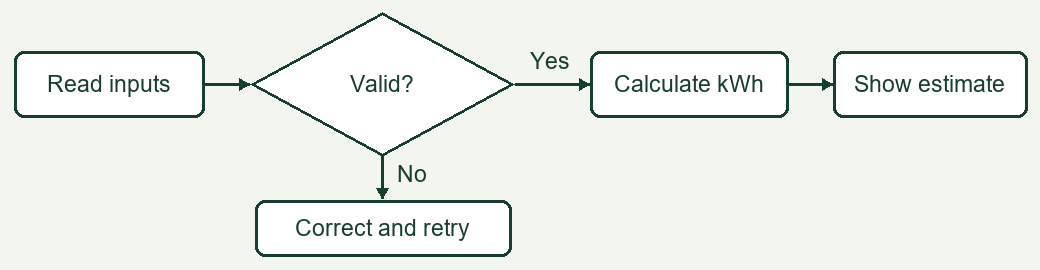
Read inputs. Valid entries lead to calculation and display. Invalid entries require correction and resubmission.
Weekly energy estimate and correction path

2.3 Number systems

The decimal wattage 10 is 00001010 in unsigned 8-bit binary and 0A in hexadecimal. In an illustrative signed 8-bit comparison, a change from 10 W to 5 W is −5. Start with +5 (00000101), invert the bits (11111010), then add one (11111011, or FB in hexadecimal). The signed change is useful for comparison. The actual form accepts positive wattage and JavaScript performs the calculation using floating-point numbers.

2.4 Hardware and peripherals

Client and optional school host
ComponentClient deviceSchool web host (proposed)
InternalCPU executes the formula. RAM holds the open page. Local storage contains the extracted files.CPU serves requests, RAM buffers responses, and an SSD stores the release.
External and I/OKeyboard or touch is input. Screen, Braille display or speech output presents the result.A network interface sends files to clients. An administrator can use a keyboard and display for maintenance.

2.5 Software stack

A desktop or mobile operating system manages memory and input devices. The browser parses HTML, lays out the CSS grid and runs JavaScript. An archive utility extracts the submission. A text editor supports maintenance, and a spreadsheet can independently check example calculations. An optional Linux host with Nginx could serve the same files.

2.6 Storage strategy

For five guides, distributing checked text with the static page is simple and works offline. As more editors and schools contribute, separate files make it easy to duplicate a topic or lose track of a source. A proposed relational design would support shared topics and multiple reviewed sources per guide.

Proposed guide catalog
RelationKeys and attributesIntegrity rule
Topictopic_id (PK), nameEach topic name is unique.
Guideguide_id (PK), topic_id (FK), title, bodyEach guide belongs to an existing topic.
GuideSourcesource_id (PK), guide_id (FK), url, reviewed_onEach source identifies its guide and review date.

One Topic can have many Guides. One Guide can have many GuideSource records. A transaction can update a guide and its references together. The shipped prototype keeps calculator entries in page memory and has no database connection.

2.7 Client, server and network

Phone or laptop -> Wi-Fi access point -> school router -> HTTPS web host
Browser  <-  HTML, CSS, script and diagram  <-  static file service

On a hosted site the browser resolves the host name, establishes a secure connection, and requests index.html with HTTP GET. After receiving the HTML it requests style.css, app.js and the diagram. HTTPS uses TLS to protect data in transit. A classroom access point forms the center of a local star. The downloaded version reads the assets from disk and the Calculate button sends no network request.

Native controls and ordinary HTML support current Edge, Chrome, Firefox and Safari as design targets. A future catalog service could answer GET /api/guides with reviewed guide records in JSON. This is a proposed endpoint. Browser and assistive-technology coverage should be checked on school devices.

3.0 HCI Evaluation, Security & Future Technologies

3.1 Usability and accessibility

I inspected the task paths using the profiles in Section 1.2. Learnability is strongest where the form shows units and an example. Entering hours per week into a daily field remains a possible mistake. Efficiency benefits from keeping inputs and results together so a student can revise one value. For error recovery, native field checks identify missing or out-of-range input and editing clears a previous estimate. For memorability, each guide keeps the same action-based label on later visits.

WCAG 2.1 design review [2]
DimensionDesign evidenceRemaining evaluation
VisualVisible labels, text units, contrast-oriented colors and a text description of the diagram (1.1.1, 1.4.3).Inspect zoom and 320 CSS-pixel reflow, including the tables (1.4.10).
AuditoryEvery task and result is available in writing. The site contains no timed audio.If a narrated guide is added, supply synchronized captions (1.2.2).
MotorNative buttons, links and expandable guides accept keyboard input. A visible focus outline marks location (2.1.1, 2.4.7).Complete the route without a pointer and verify focus after invalid input.
CognitiveExamples explain units. Stable headings and explicit input labels support orientation (2.4.6, 3.3.2).Ask first-time users to explain what the result measures. Listen for confusion between kWh and emissions.

These are inspection findings. Task success rates and satisfaction require observation. Ask a first-time student to calculate a weekly estimate, recover from an invalid entry, and explain the result. Record the first wrong turn and whether they can finish without a hint.

3.2 Privacy, security and professional ethics

Privacy notice. The calculator uses only watts and hours. Entries remain in the current page. The project code sets no cookies, stores no history, and transmits no form data. A hosting provider may keep access logs. A school deploying the site should explain any logging purpose, limit access, and set a retention period.

Sections 11 and 20 of the Philippine Data Privacy Act address principles for processing personal information and protective safeguards [3]. The design minimizes collection. Before collecting identifiable feedback, a school would need to determine a lawful basis, explain the purpose, and protect the records. For hosting, use HTTPS, restrict publishing privileges, and review changes. Respect for privacy and honesty also mean labeling estimates clearly and avoiding claims of measured carbon savings [4].

3.3 Analytics and future computing

The current estimator supports a simple what-if analysis. Holding watts constant while changing hours isolates the effect of time. A future classroom activity could compare anonymous counts of correct unit explanations before and after using the tool. Report the number of responses alongside the percentage so a small group cannot be mistaken for a school-wide trend.

Generative AI could draft simpler versions of difficult guide passages. Provide only the approved source text, require a teacher to check the factual meaning and units, then try both versions with readers. An AI-generated local recycling rule could send a student to the wrong bin. Local collection guidance should come from a named collector or school contact. An autonomous agent would add little to the fixed arithmetic and would make the result harder to reproduce.

3.4 Synthesis and prioritized recommendations

The working site turns a small decision into a checkable estimate without requiring an account or internet connection. Its main limitation is the gap between the scenario entered and what actually happens in a classroom. The next evaluation should check both whether a visitor can finish the calculation and whether they can interpret it.

Implementation priorities
PriorityChangeAcceptance check
HighTest the calculator with students using a keyboard, screen reader and small phone. Revise unclear units or feedback.A learner can correct an entry, hear or read the updated result, and identify the seven-day period.
MediumAdd a school-reviewed local collection guide with an owner and review date.A reader can trace a bottle-disposal decision to the current local rule.
LowPilot two teacher-reviewed versions of Climate basics and compare anonymous comprehension counts.Publish the question, response totals and limitations before selecting wording.

References

[1] United Nations. Goal 13, target 13.3.

[2] World Wide Web Consortium. Web Content Accessibility Guidelines 2.1.

[3] National Privacy Commission. Republic Act No. 10173, Sections 11 and 20.

[4] Association for Computing Machinery. ACM Code of Ethics and Professional Conduct.